Thursday, January 14, 2010
Final Reflection
I have really enjoyed this project because I have learned about a lot of good resources that I can use in the classroom or in my personal life. I am not a very tech savvy person to begin with but I feel like I have learned a lot from this project and can use the computer for more things than just to type a letter now. This is the first time that I have blogged. I did the biggest majority of these exercises on my own and have come up against some blocks that I could not overcome by myself. I now have the knowledge of things that are out there and things that can be helpful / things that I would like to use. I will have those resources on my brain and can get help overcoming the roadblocks to get them fully functioning in the classroom. If I had not participated in this activity I would not have a new outlook on technology and how it can be incorporated into the classroom. The learning has definitely not stopped here but it has only begun.

Rollyo
I never could get an account started in Rollyo but I do understand that you can narrow down websites and only get info from your favorite ones that you trust. I like this activity and I will get help to better understand how to get account running so I can get info from my most trusted websites.
Shelfari
I liked this activity. It can help you organize books you have read, want to read or will read in the future. It could help you keep up with the books that you use in your class throughout the year. I added one book to my shelf and when I tried to add another book to that shelf I lost the first one. I enjoyed exploring this and if I decide to use this feature in the room or for own personal use I will ask for help on creating and saving my bookcase shelves.
Image Generators
Life is as easy as you make it! Life is as easy as you make it!
I made a street sign on the first discovery resource for Week 10 and I tried twice to copy and paste. It pasted the text for the sign but it did not paste the sign. I tried it twice with copy and paste and I am not really familiar with other ways to put it in my blog. I will ask someone to help. I enjoyed this activity.
I made a street sign on the first discovery resource for Week 10 and I tried twice to copy and paste. It pasted the text for the sign but it did not paste the sign. I tried it twice with copy and paste and I am not really familiar with other ways to put it in my blog. I will ask someone to help. I enjoyed this activity.
Tuesday, January 12, 2010
Twitter blog for activity 18 and 19 together.
I explored the twitter website and I finally did get an account and was able to tweet about what I was doing. I never could figure out how to get the picture taken and posted. I tried to find some people that I could follow and when I went to google I found a bunch of celebrities that I do not know or like so I was no interested in even looking at any of their tweets. I do not think that this is something that I would use in my spare time or even in the classroom. I do not have time to keep up with other people on twitter much less to tweet so others can keep up with me. I am a very personal person and if I want to tell others what is going on I can do it in a less private way than to tweet about it on the computer.
Monday, January 11, 2010
Tagging
I think that tagging is a useful tool. It helps you find info about the topics that you are interested in and it lets you do this in a quick way. I think that this feature is very effective in helping teachers find info to use in the class and it is a great way for people to share ideas. I like the tagging feature.
Del.icio.us
I explored this website and I think that it is a good website to find info on different topics that you are looking for. It makes it easy to find research that has been compiled from a lot of different people.
Tuesday, January 5, 2010
Sandbox/Wikis
I enjoyed reading every one's favorites. I tried to include a favorite of mine but after I thought that I had established an account to do so it still would not let me add to the page.
Wikis
Wikis seems to be something that could be used in the classroom. I on the other hand would be afraid to use it considering that it can be changed by other people. I would be afraid that something would end up on the site that would get me or my school in trouble. Therefore I would not be willing to use it for anything. I guess I am just a worrier.
Wednesday, December 9, 2009
Ebooks.
I liked the children's e books site because it had a lot of different books by different authors. I liked how you could choose the grade level and author easily. It could serve as the listening center in the classroom. The computer and that site could replace tape players and cd players. I can tell how it would be very beneficial to the classroom teacher and parents at home as well. I would not want it to replace the act of actually having a book in your hand and reading but I think it would be a good tool to support reading.
Podcasts
I explored podcasts and I was really surprised to see that it had a good selection of music for different age groups and religions. It could be used in the music classroom to give a wide variety of different music to the children.
Online Video
I explored the Youtube and Yahoo videos and it would not let me have access to either of these. I guess that maybe it is to violent or has adult material on it for it to be blocked at school. I have heard about some of the things that people see on youtube and have been disgusted by it. I do not think that these sites have a place in my classroom. I also looked at google videos and I saw a lot of videos available but none that I thought was educational and served a purpose in the classroom.
Tuesday, December 1, 2009
online applications and tools
I went into the online application and tools and I created a resume at googledoc. It was quick and easy. I never could find out how to share my document with co workers. I guess I will have to ask a co worker how to share this information. I tried!
Tuesday, November 3, 2009
Tuesday, October 27, 2009
Technology
I think that technology is a good thing. I can see how it can be useful in all areas of life. It can help you in the classroom and also help you to organize things in your personal life as well. I am enjoying learning more and more about technology and I have really enjoyed the flickr part of this assignment.
Flicker Album Maker
I looked at some of the programs available and I really liked the flicker album maker. It would be useful to make a album of things that we do in the classroom on a monthly basis or on a yearly basis. It would also be good to make monthly or yearly albums of my four year old and my baby whose on the way.
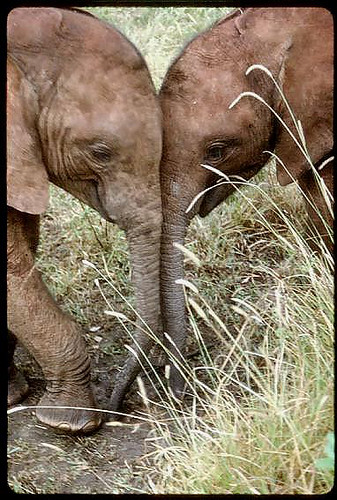
cute elephants
I found this cute picture of two elephants snuggling on flickr at hialoakapua. I love elephants and think that they are beautiful animals. I collect elephant knick naks and have always been told that if you have an elephant figure that has it's nose up that it means good luck. I don't think that these animals should be killed just for their tusks and the value of the ivory. The elephants life is worth more than that. These two elephants deserve their life and the life of their mom more than we deserve jewelry etc.

Tuesday, October 13, 2009
Misty's Blog
My reflection on the 7 1/2 learning habits is very positive. I think that everyone should have a positive attitude toward learning and think that they can learn no matter how old they are. I have never blogged before but guess what I'm doing it now. I came into the lab with the goal of setting up my blog. I had an open mind and with the help of the support team that is in here with me right now I have completed a blog. Yeah! I have used lots of the 7 1/2 habits to complete my technology assignment for this week. The main thing is that I had fun.
Subscribe to:
Posts (Atom)